Free Online English Typing Tutor: Master Touch Typing & Finger Placement
💡 Pro Tip: Accuracy Over Speed for Govt Exams!
In the beginning, your typing speed will be very slow. This is completely normal! Do not rush. If you focus 100% on typing accurately with proper keyboard finger placement, your typing speed will automatically increase. Practice each free typing exercise continuously without resetting.
Note: These starting chapters might feel a bit slow, but they build your core foundation. While results vary by individual, students who practice daily and strictly follow our guided learning program often master touch typing from home in just 30 days!
Mobile Phone User?
You don't need an expensive laptop! Just buy a cheap OTG or Type-C adapter, connect a standard USB physical keyboard to your phone, and practice right here. True muscle memory requires feeling real keys!
Welcome to your ultimate free online typing tutor. To clear Indian government typing exams like SSC CGL, CHSL, LDC, Informatics Assistant, Tax Assistant, Computer Sanganak, Junior Assistant, Clerk, and Beltron DEO tests, you must learn to type fast without looking at the keys. This technique is called Touch Typing. Follow our step-by-step free typing lessons to build finger muscle memory.
Posture & Wrist Placement
Before you touch a single key, you must set up your body. Bad posture leads to slow typing and fatigue. Good posture gives your fingers the freedom to fly across the keys.
🧍 Body & Screen
- Sit up straight with your back supported and feet flat on the floor.
- Keep your screen at eye level to avoid neck strain.
- Keep your elbows bent at a comfortable 90-degree angle.
⚠️ The Wrist Rule
- Crucial: Keep your wrists hovering slightly above the keyboard or desk.
- Do not rest your wrists flat on the table. Resting them acts like an anchor, limiting your finger reach and slowing you down.
The Anatomy of a Keyboard
Before you can type without looking, you must understand the geography of your keyboard. Standard keyboards are divided into specific zones.
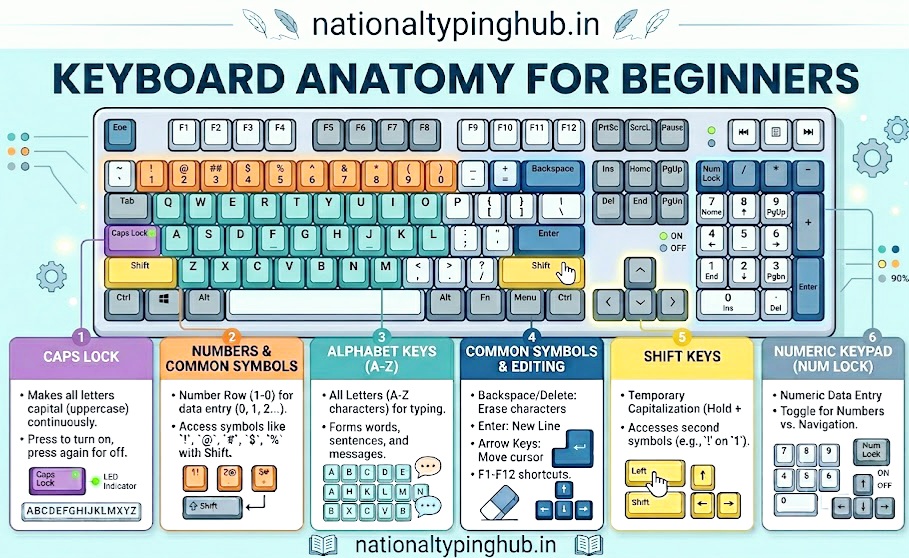
Take a moment to study the different zones before proceeding.
Primary Keys
- Alphabet Keys: The 26 letters (A-Z) used to type words. They are spread across three main rows.
- Numeric Keys: The numbers (0-9) located in a row above the alphabets, and often on a right-side Numpad.
- Special Symbols: Keys like @, #, $, and punctuation marks (, . ; ') used for grammar and data entry.
Control Keys
- Shift Key: Used to type capital letters or the upper symbol on a dual-character key.
- Caps Lock: Makes all typed letters capital. (Rarely used in professional touch typing; use Shift instead).
- Num Lock: Activates the right-side numeric pad. Crucial for Data Entry Operator exams.
Visualizing Finger Placement
Notice how the colors mirror each other perfectly. The red keys belong exclusively to your Pinky Fingers, the orange to your Ring Fingers, and so on. This symmetry makes touch typing highly intuitive.
How Touch Typing Works
Touch typing is not magic; it is simply following three strict rules. If you break these rules, you will hit a speed wall at around 30 WPM.
Rule 1: Always Start at Home Base
Your fingers must always rest on the middle row of the keyboard (ASDF JKL;). You should feel the small physical bumps on the F and J keys to find your position without looking.
Rule 2: Reach and Return
When you need to type a letter on the Top or Bottom row, you reach the assigned finger out, strike the key, and immediately snap it back to its Home position. Your hands should not drift around the board.
Rule 3: The Opposite Shift
To capitalize a letter, you must use the Shift key on the opposite side of the keyboard from the letter you are typing. (e.g., Use right Shift to capitalize 'A').
Mastering ASDF JKL;
This is the most important row. Place your fingers lightly on the keys below.
Left Hand:
- Pinky Finger on A
- Ring Finger on S
- Middle Finger on D
- Index Finger on F
Right Hand:
- Index Finger on J
- Middle Finger on K
- Ring Finger on L
- Pinky Finger on ;
Practice 1: Home Row Only
Timer starts when you type. Type continuously for 10 minutes without stopping!
Reaching for QWERTY
Keep your fingers on the Home Row. To type letters on the Top Row, stretch the corresponding finger up, strike the key, and immediately bring it back down to Home.
Practice 2: Top Row Reaching
Timer starts when you type. Type continuously for 10 minutes without stopping!
Curling for ZXCV
Just like the Top Row, your fingers will curl downward to hit the Bottom Row keys and then snap back to the Home Row.
Practice 3: Bottom Row Curling
Timer starts when you type. Type continuously for 10 minutes without stopping!
Combining All Three Rows
Now it is time to combine everything. Remember the Opposite Shift Rule for capital letters!
Practice 4: The Pangram
Timer starts when you type. Type continuously for 10 minutes without stopping!
Essential for Data Entry
For Bank exams and Data Entry roles, numbers are critical. You must stretch your fingers two rows up from the Home Base, strike the number, and return immediately. The Left Index handles 4 and 5, while the Right Index handles 6 and 7.
Practice 5: Numeric Stretching
Timer starts when you type. Type continuously for 10 minutes without stopping!
Exam Readiness Test
This is the final test of your muscle memory. This string contains capital letters, numbers, and punctuation. If you can type this continuously with high accuracy, you are ready for your typing exam.
Practice 6: The Final Boss
Timer starts when you type. Type continuously for 10 minutes without stopping!
🏆 Final Pro Tip: Consistency is Key!
To easily clear exams like Informatics Assistant, Tax Assistant, or Sanganak, practice these exercises for 10-15 minutes every single day. Do not worry about speed in your first week. Once your fingers naturally memorize the layout, your speed will skyrocket automatically!